v1.26.0 - GM Multitasking, Updated Reports, Emergency State and more!
Update will be live the morning of July 8th!
Multitasking:
This is an optional universal setting.
When turned on, Multitasking will allow Game Masters to drag and drop alerts (including hint requests), have multiple alerts open at once, and will remove the overlay behind alerts that partially obscures cameras.
Once an alert is moved, future alerts will pop up in the same place.
This does make hint requests less visually obvious, please inform game masters before enabling!

Reports
Reports will now have images for Loss Prevention instances where players do not match. You need Tailscale active to view these images outside of venue.
Daily Reports
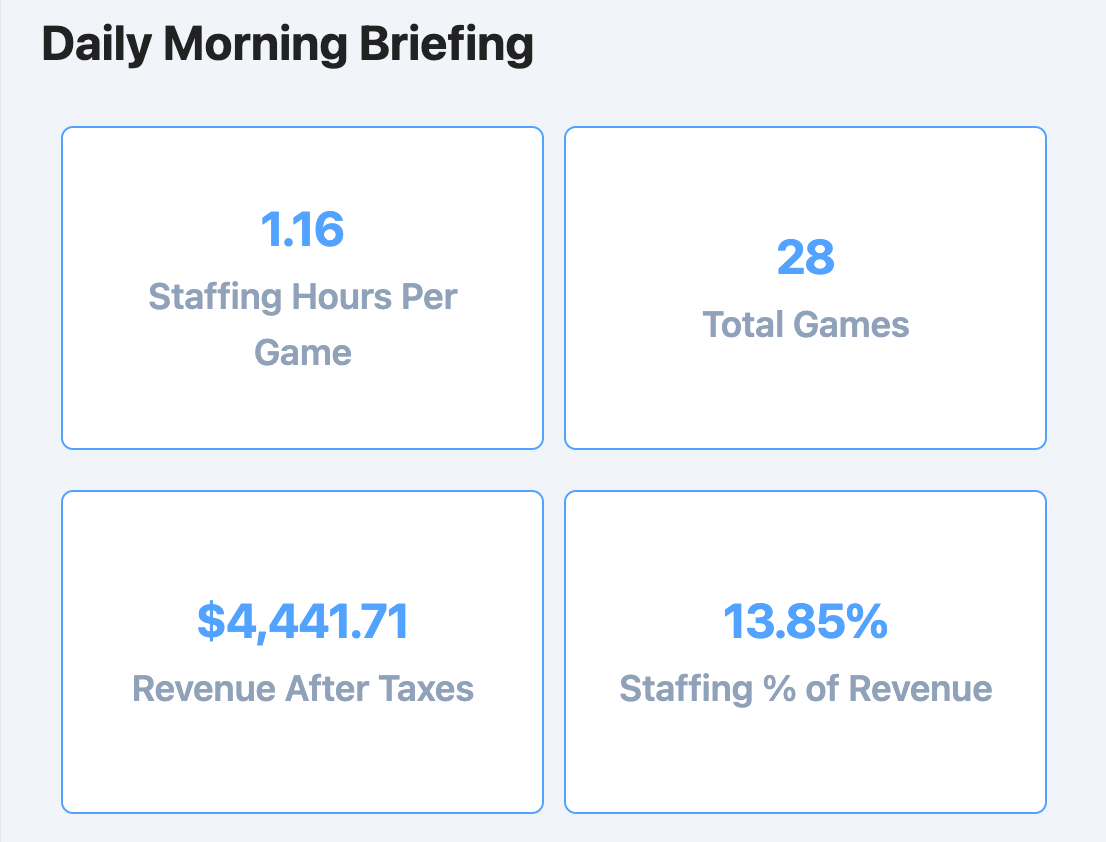
The Daily reports have now been split into a Morning Briefing and a Daily Ops Log:
Daily Ops will give you a very detailed look at what happened in the venue yesterday. Watch an overview of the Daily Ops report here!
Morning Briefing gives you a quicker overview of what happened, without getting as specific. Watch an overview of the Morning Briefing here!
Both of these are added to the Report Settings tab. In there you’ll specify who should receive each report and turn certain categories on or off depending on what you want to see.
Weekly Report
Additions to multiple sections of the Weekly Report:
List revenue per room with “Not a Game” items broken out
Pull in venue survey results:
Percent recommended
Overall experience score
Number that requested to speak to owner
Rebookings as a percentage of games played
New vs Returning customers
Review count as a percentage of games played
Average hints per game
Average time added to games
Paused game count as a percentage of total games played
Added Upcoming Booking Count
Watch an overview of the new Weekly Report here!
Monthly Report
Added “How Do You Know Each Other” question results to the Host Survey Summary
Watch a walkthrough of the Monthly Report here!
Playbook Improvements
Custom in-play game screens!
You can now use our new SDK to create and control screens that you build for a game.
This is a pretty involved process, documentation can be found here.
You can send video hints to the countdown screen.
You can adjust the amount of time a hint will stay on the countdown screen.
Found in Game Settings → Playbook → Countdown → Hint Text → Duration
Drawbridge will now display device connection status and store log of disconnects.

Indicator lights on the Devices menu on the GM page You can now create actions that add or remove time from a game.
The Wait Action can now use decimal points for values under 1 second.
Added ability to create an Action that allows SSH into a machine
Emergency State
You are now able to trigger an ‘emergency state’ from the GM page. If using Mythric game control, you have to configure the emergency state in M3 in order for this button to activate it.

If you’re using Drawbridge Playbooks, you can create an action that uses Emergency State as a When Trigger.

You can then add in ending games, turning lights on, or whatever you’d like to occur when “Emergency Mode” is started.
Point of Sale Updates
Added a display to show if Resova webhooks are turned on and if they aren’t, it will automatically configure the webhook for you. The webhook syncs with Resova anytime a booking is made, keeping things up to date and happening in real-time.

Found in settings under Integrations in Point of Sale -> Resova Added an MQTT topic for resyncing bookings (bookings/resync)
Added initial integration with Off The Couch for booking and customer information.
Game Forensics
If enabled, pre-game checklist results will show up on the game forensics page
When Game Masters change during a game, it will show in the Game Activity Log in Game Forensics.

Mythric Connection Log
You can now view a log of Mythric disconnects/reconnects to Drawbridge. This is found in Game Control settings under the Mythric tab

Historical Reviews
The Reviews tab will now show historical reviews and allow you to filter them by date range, star rating, and reviewer name. This also shows the response sent.

Privacy Updates
Due to privacy laws in certain states, we have added disclaimers that appear when turning on Magic Moments or Loss Prevention for your venue. Ensure that these disclaimers are added to the waiver for your venue.
Our Drawbridge license and data terms were cleaned up and clarified. The new Software License and Data Processing Agreement confirms your ownership of your data, discloses how backups and gameplay recordings are stored and deleted, names our AI and cloud providers (OpenAI and Google Cloud), states that franchisors can access operations and customer data for their branded venues, and sets out your responsibility for consent when recording people (see privacy laws mentioned above). Effective with this release; continued use constitutes acceptance. Full text here.
Small Updates
You can now filter booking notifications that are sent to Discord to only send rebookings.
Added Kids Mode icon to Autohint and Hint Alert popups
Added ability to toggle off task descriptions (Settings → General Settings → Daily Tasks)

If training your own GameSense detections, there is now a log of local recordings to make image collection easier
When a Reset Scan fails, the resetter will be notified with a popup in the bottom right.
Added an MQTT topic (bookings/resync) for resyncing bookings
Disable objective triggers on current task for 3 seconds after objective change
Fixes
Playbook ability to have text hints overlay video/image hints
Use “show more” for more employee dropdowns
Exclude objectives with durations longer than 60mins and sessions with durations longer than 90mins from game statistics averages
Adjust more settings pages for mobile use
Overview metrics wrapping to a second row
Magic Moments not autorecording when there isn’t a Team Summary
Rebooking goals use correct timezone information
Weekly report showing the wrong number of rebookings
Fix scroll wheel on employee login dropdowns for mobile
Fix guest lobby in progress section not always scrolling when certain game cards are not visible