May 13th, 2025
v1.14.0 - New Overview Metrics, Weather Insights, and Goals!
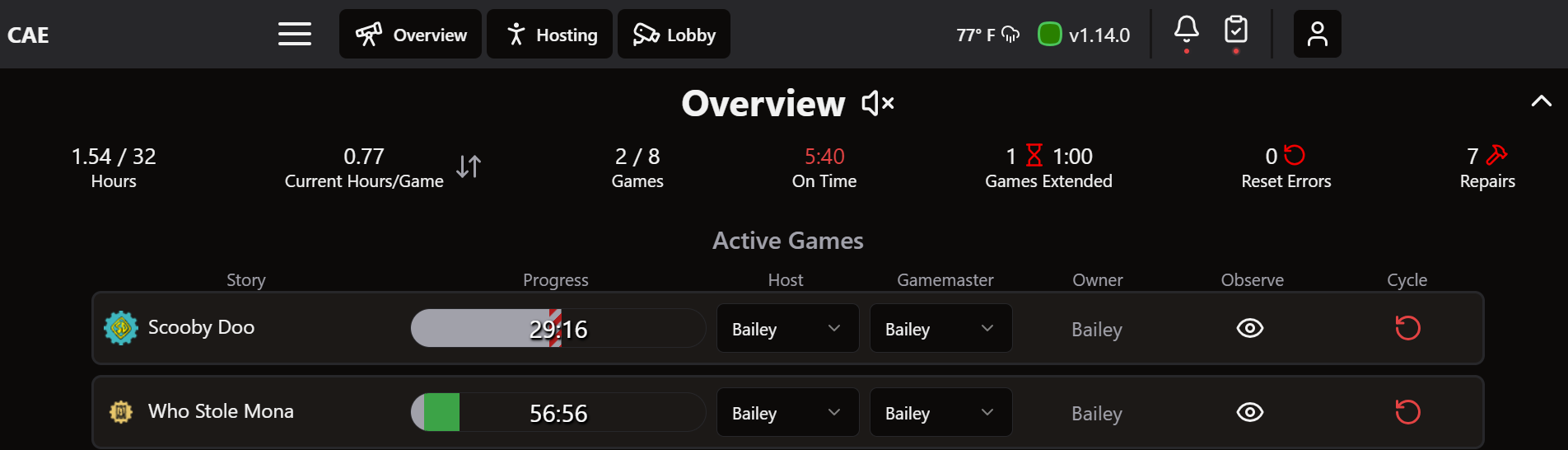
Hellooo new overview metrics! More numbers that make it even easier to forecast out your day. We also added weather information, so you literally get the forecast too ;)
Overview Page Updates
Metrics
Hours: Staffing hours worked out of total scheduled hours for the day
Hours/Game: Use the arrows to swap between current staffing hours per game vs future
The popup shows an hourly breakdown of bookings and staffing hours for the day
Games: Games delivered so far out of total bookings today
Games Extended: Grouped ‘Games Paused’ and ‘Time Added’ into one metric called ‘Games Extended’
More detail about what is happening in games will appear on the menu underneath this metric when clicked

Navigation Bar Additions
Weather forecast - gives interesting data about what may be happening throughout the day. Can lead to reports on how weather impacts business.
Click to see an hourly forcast
Can be configured in Settings → Weather
Clicking on the name of whoever’s signed in gives a more specific summary of their day
‘Host’ tab shows resets and times, if games are going in on time, reset errors, and rebookings
‘Gamemaster’ tab shows average hint response time, escape rate, average number of hints sent, props forced, games paused, and time added
‘All’ tab shows daily tasks completed, reviews, and training tasks completed

Additional Features
New Sidebar Page: Goals
Set goals around rebookings and reviews for any period of time
Compare against previous goals
Click on a goal to edit it

Timing Resets from the Hosting/Gamemaster Page
When a game is ended in the needs reset column, a white clock will appear. Tapping the clock starts the timer and turns it green. Another press will pause the time and turn it red.
This will work to time a reset while the game is in the ended or in epilogue state, but the timer will stop when the story is reset in Drawbridge and moves to idle.

The Game Master page now counts ‘props forced’
This will count any prop triggered by the game master during a game, appears in parentheses next to Devices tab
Will also be built into reports

Other Updates:
Removed revenue on schedule helper graphs
Daily Tasks will expire after 7 days, so tasks from Friday can still be completed on Monday, etc.
When opening the Resova photo page for a group, Drawbridge will auto-check the ‘did they escape?’ box and autofill the game completion time
Integration with WaiverElectronic
Show date of last reset in the Training Tracker to alert employees before their reset expires